
Categories: AI CRM, AI Email Marketing, AI Sales Assistant
DitLead Review: The Ultimate Sales Outreach Tool?

Let's be real for a second. If you've been in the sales or marketing game for more than a week, you know the grind. It's a chaotic ballet of a dozen open browser tabs. You've got one for your CRM, another for LinkedIn Sales Navigator, a third for your cold email platform, and maybe a fourth for a spreadsheet you swear you'll organize one day. It’s exhausting. We've all been searching for that mythical beast, that one tool to rule them all. That one platform that brings everything under a single, sane roof.
Every so often, a new contender steps into the ring, promising to be the one. And lately, I've been hearing a lot of buzz about a platform called DitLead. It claims to be an all-in-one hub for outbound sales, combining LinkedIn outreach, cold email, and even a CRM. So, naturally, I had to see what all the fuss was about. Is it another tool that overpromises and underdelivers, or is it the real deal? Let's get into it.
What Exactly is DitLead Anyway?
At its core, DitLead is an outbound sales automation and engagement platform. That's the fancy marketing speak. In plain English? It’s a tool designed to stop you from tearing your hair out while trying to find and connect with new customers. It pulls together the three main pillars of modern B2B outreach: LinkedIn, email, and lead management. Instead of duct-taping three different services together and praying the Zapier connection doesn't break, DitLead aims to be the central nervous system for your entire outbound strategy. And one of its biggest claims to fame, which frankly made me raise an eyebrow, is the ability to connect unlimited email and LinkedIn accounts. More on that in a bit.
The Features That Actually Matter
A platform can have a million features, but only a handful truly move the needle. After kicking the tires on DitLead, a few things really stood out to me as being genuinely useful for anyone serious about traffic generation and client acquisition.
Taming the LinkedIn Beast
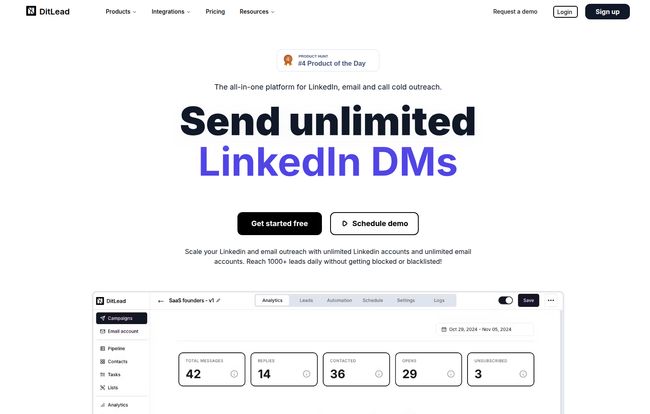
Ah, LinkedIn automation. It’s a bit of a controversial topic, isn't it? Done poorly, it's spammy and can get your account restricted faster than you can say “I’d like to add you to my professional network.” But done right, it's an incredible way to scale conversations. DitLead wades right into this with tools for automating connection requests, messages, and follow-ups. You can build out entire sequences with a drag-and-drop flow, which is pretty intuitive. For example: View a profile, wait a day, send a connection request, wait for acceptance, then send a personalized message. It’s all there.
Visit DitLead
But the craziest part is what I mentioned earlier: unlimited LinkedIn accounts. For a marketing agency managing outreach for multiple clients, or a sales team with several SDRs, this is huge. You can rotate between accounts to spread out your activity and stay off LinkedIn’s radar. It's an advanced tactic, and it's baked right in. Pretty impressive.
Is Cold Email Really Dead? (Spoiler: No)
Every year, some guru declares cold email dead. And every year, my agency closes deals from… you guessed it, cold email. The secret isn't abandoning it, it's doing it smarter. DitLead seems to get this. First off, you get unlimited email sending from unlimited email accounts on the paid plans. That’s table stakes for a serious platform.
But the two features that really count are Email Warmup and Sender Rotation. If you've ever had your emails go straight to spam, you know how crucial deliverability is. The warmup feature automatically sends and receives emails from your account, interacting with them to build a positive reputation with providers like Google and Microsoft. I've used standalone services like Lemwarm that cost $29/month just for this! Having it included is a massive value-add. Sender rotation then lets you spread your campaigns across multiple inboxes, protecting your domain's reputation for teh long haul. It's professional-grade stuff.
AI Personalization That Doesn't Sound Like a Robot
We've all received those AI-generated emails. "I saw you are the CEO at [Company Name]. I am impressed by your work in the [Industry] space." Yawn. It’s painfully generic. DitLead has an AI personalization feature, and I was skeptical. It scans a prospect's LinkedIn profile and suggests icebreakers or personalization lines. In my tests, it was… surprisingly decent. It's not going to write a Shakespearean sonnet for you, but it can pull out a recent post, a job change, or a shared interest to give you a solid starting point. My advice? Use it as an assistant, not a replacement. Let the AI find the nugget of gold, but you should be the one to polish it.
The All-In-One Dream: The Built-in CRM
The biggest headache with most outreach tools is the data sync. You get a positive reply in your email tool, then you have to manually update the lead status in your CRM like Salesforce or HubSpot. It's a small task that, compounded over hundreds of leads, becomes a major time-suck. DitLead's solution is a built-in sales engagement CRM. It gives you a unified pipeline where you can see every touchpoint—LinkedIn DMs, emails, follow-ups—all in one contact record. This is how it should work. A single source of truth.
Now, here's the catch. And it's an important one. The free plan has very limited CRM features, and you only get full CRM access on the Team plan and above. So while the all-in-one dream is real, it comes with a price tag. Transparency matters, and that’s a key distinction to be aware of.
Let's Talk Money: DitLead Pricing Breakdown
Alright, this is where the rubber meets the road. Is it affordable? Here’s a quick, no-fluff breakdown of their plans. I've always felt that pricing pages can be a bit confusing, so here it is in my own words.
| Plan | Price (Monthly) | Who It's For | Key Features |
|---|---|---|---|
| Free | $0 | The Curious Tester | 200 contacts, 1k emails/mo, 100 verification credits. It's a solid, generous trial to feel the platform out. |
| Starter | $31 | Solo Founders & Small Teams | Unlimited contacts, emails, and email accounts. Plus unlimited email warmup. This is the real starting point and an incredible value. |
| Team | $82 | Growing Sales Teams | Everything in Starter, plus LinkedIn prospecting, full CRM access, and API/Webhook access for custom integrations. |
| Popular | $125 | Agencies & Power Users | Everything in Team, plus a million verification credits, dedicated IPs for top-tier deliverability, and agency-specific features. |
Prices are based on information available at the time of writing. Always check the official DitLead pricing page for the latest details.
The Good, The Bad, and The "It Depends"
No tool is perfect. Let's weigh things out. On the plus side, the value proposition here is off the charts. Getting unlimited email accounts, unlimited warmup, LinkedIn automation, and a CRM in one place for what starts at $31 is fantastic. It’s like buying three or four different SaaS tools for the price of one. The all-in-one nature isn't just a gimmick; it’s a genuine workflow improvement.
On the other hand, the limitations on the lower tiers are real. You don’t get the full CRM experience or LinkedIn prospecting until you’re on the $82/month Team plan. And dedicated IPs, which are critical for high-volume senders, are reserved for the top-tier plan. But is this really a "con"? I don't think so. It's a logical progression. You pay more, you get more powerful features. That’s just business.
So, Who Is DitLead Actually For?
After spending some time with it, I've got a pretty clear picture of the ideal DitLead user.
This is a home run for B2B agencies managing outreach for multiple clients, startups and small businesses where the founder or a small team is handling all the sales, and sales development (SDR) teams who want a unified platform to work from without constantly switching contexts.
Who might want to pass? Maybe a massive enterprise that's already waist-deep in a highly customized Salesforce ecosystem and has rigid processes. Even then, the API access on the Team plan could allow for some interesting integrations. But for the 90% of businesses that need a powerful, streamlined, and cost-effective way to generate leads, this is a very, very strong contender.
My Final Verdict
In a crowded market of single-function tools and bloated, overpriced platforms, DitLead has managed to carve out a really smart space for itself. It feels like it was built by people who have actually done outbound sales and understand the daily frustrations. It’s ambitious, powerful, and priced very competitively.
It's not a magic button that will instantly fill your pipeline—no tool is. You still need a solid strategy, good copy, and a great offer. But what DitLead does is remove a massive amount of friction from the process, freeing you up to focus on what actually matters: having quality conversations with potential customers. For that reason alone, it gets a strong recommendation from me.
Frequently Asked Questions
- Is there a genuinely free plan?
- Yes, there is. It's not a timed trial, it's a free-forever plan that gives you 200 contacts and 1000 emails per month. It's perfect for testing the core features before you commit to a paid subscription.
- Can I really connect as many LinkedIn accounts as I want?
- Yep. On all plans, even the free one, there are no platform-imposed limits on the number of LinkedIn accounts you can connect. This is one of its most unique selling points, especially for agencies.
- How do the email verification credits work?
- It's pretty straightforward. 1 credit is used to verify 1 email address. This helps you clean your lists and avoid bounces, which protects your sender reputation. The plans come with a generous amount of credits, from 100 on the free plan to a million on the Popular plan.
- What is sender rotation and why should I care?
- Think of it like load balancing for your emails. Instead of sending a 1,000-email campaign from a single inbox (which can look spammy to email providers), sender rotation lets you spread those sends across multiple email accounts automatically. It's a key feature for maintaining high deliverability.
- Which plan do I need for full CRM access?
- To get the full, unrestricted CRM features, you'll need to be on the Team plan or higher. The Starter plan has some CRM capabilities, but the full pipeline management and customization comes with the Team subscription.
Reference and Sources
- DitLead Official Website
- Official DitLead Pricing Information
- Backlinko's Guide to Cold Email - A great resource for brushing up on outreach strategy.
- Neil Patel's Take on LinkedIn Automation - For context on the do's and don'ts of automating on the platform.


