
Categories: AI Copilot, AI WORD, AI Writing Assistants
Ghostwriter AI Review: AI Inside Your Office Apps?

Alright, let’s have a real chat. How many times have you found yourself with 17 browser tabs open—one for your Word document, one for a thesaurus, one for Google Translate, and fourteen for ChatGPT, each with a slightly different prompt to rephrase the same cursed paragraph?
It’s the modern content creator's dance. The alt-tab shuffle. We’re drowning in powerful tools, but they all live in different houses. The dream has always been to have that power right where you work. In your document. In your spreadsheet. In your inbox.
I’ve seen a lot of tools promise this. Most of them are clunky, standalone apps that just add another step to the process. So when I stumbled upon Ghostwriter AI, an add-in for Microsoft Office, my professional skepticism was tingling. But so was my curiosity. An AI assistant that lives inside Word, Excel, and Outlook? Okay, you have my attention.
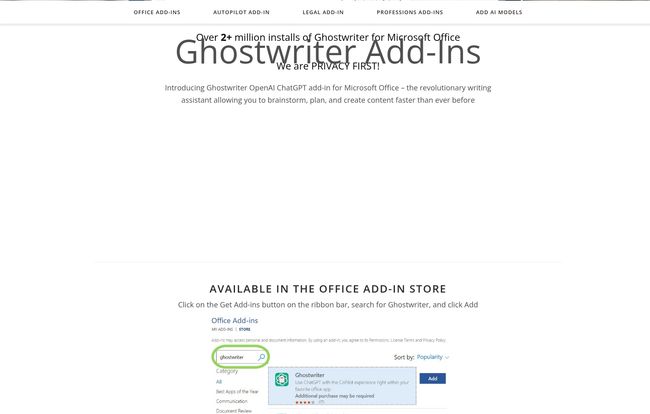
Visit Ghostwriter AI
So, What is Ghostwriter AI, Really?
Let's cut through the marketing fluff. Ghostwriter AI is not a separate program you have to launch. It’s a series of add-ins you install directly into your Microsoft Office applications from the official store. Think of it less like hiring a new employee and more like giving your trusty old car a brand-new engine. The exterior is the same familiar, comfortable Microsoft Word you've used for years, but under the hood, there’s suddenly a whole lot more horsepower.
It plugs into various AI models—most notably the GPT family from OpenAI, but also Google's Gemini and others—and lets you use their brainpower without ever leaving your document. This isn't just about writing, either. It has specific tools for Word, Excel, Outlook, and even PowerPoint.
The Features That Actually Move the Needle
More Than Just a Fancy Spellchecker
The core of Ghostwriter is its integration across the Office suite. In Word, it can draft entire sections, rewrite paragraphs in different tones, or summarize long documents. This is the stuff we've come to expect from AI writers. But the real magic happens when you look at the other apps. In Excel, it can help you write complex formulas from a plain English description. I can't tell you how many hours of my life I could have saved if I had this a few years ago. No more Googling “how to VLOOKUP across three sheets with a condition.” You just ask.
In Outlook, it helps you draft polite, professional, or even stern emails in seconds. And in PowerPoint, it can generate slide content to get you started, saving you from the terror of the blank page.
Choose Your AI Brain
One thing I genuinely appreciate is that you’re not locked into one AI model. Power users know that GPT-4 is great for creative tasks, while another model might be better for pure data analysis. Ghostwriter allows you to add different AI models, giving you the flexibility to pick the right tool for the job. This is a subtle feature, but it shows a deeper understanding of how people actually work with AI today.
Personas and Quick Actions Are a Lifesaver
Ghostwriter comes with built-in “personas.” You can ask it to write as a 'skeptical expert' or a 'friendly marketer,' and it adapts its tone. This is a massive time-saver compared to typing “rewrite this but make it sound more academic” for the tenth time. The quick action prompts for summarizing, translating, and improving text are also incredibly useful for day-to-day tasks.
Let's Talk Turkey: Ghostwriter AI Pricing
Okay, this is where things get interesting. Ghostwriter isn’t a subscription. It’s a one-time purchase, which feels like a blast from the past in the best way possible. I’m so tired of every single service wanting a piece of my monthly budget.
The pricing is modular. You can buy the add-in for each Office application separately or get a bundle. Here's a quick look at the single-user license costs:
| Product | Price (USD) | Notes |
|---|---|---|
| Ghostwriter Word (Basic/PRO/Ultimate) | $50 / $100 / $150 | Tiers offer more advanced features like custom models and increased context. |
| Ghostwriter Excel Add-in | $50 | AI-powered formula generation and data analysis. |
| Ghostwriter Outlook Add-in | $50 | For drafting and replying to emails. |
| Ghostwriter PowerPoint Add-in | $50 | Assists with presentation content. |
| Ghostwriter Office Bundle | $200 | Includes all four add-ins for the best value. |
The Shared API Key Elephant in the Room
Now, here’s a critical detail. The purchase price includes the use of a shared OpenAI API key. For non-techy folks, this means you can start using the tool right away without setting up your own account with OpenAI. It’s convenient. However, as an SEO and a heavy user of these tools, this gives me pause.
A shared key means you’re sharing resources with other users. This could potentially lead to slower response times during peak hours. More importantly, there's the privacy question. While Ghostwriter seems to have a strong stance on privacy, any data sent through a shared key is, well, shared. To their credit, they openly recommend you use your own personal API key for privacy and performance. I would strongly second that recommendation. Think of the included shared key as a set of training wheels. It’s great for getting started, but you'll want to take them off pretty quickly.
My Honest Take on Ghostwriter AI
So, is it worth it? Like most things in SEO and tech, the answer is: it depends.
The biggest advantage is the native integration. Having AI tools inside the software where you spend 80% of your day is a legitimate productivity multiplier. The one-time fee is also a huge plus. The profession-specific add-ins for lawyers and accountants are a brilliant touch, showing they're thinking about actual professional workflows.
On the flip side, there is an upfront cost. For someone who only occasionally needs AI help, a free tool in a browser might be enough. And you really should be prepared to get your own API key from OpenAI to get the most out of it, which adds a small layer of setup and usage-based cost.
I also ran into a couple of little hiccups. When I was looking for more info, I found a broken link on their site that led to a 404 error. It’s a minor thing, something that happens to everyone, but it’s a reminder that it's a small company, not a massive corporation. That can be a good or a bad thing, depending on your perspective!
Who Should Buy Ghostwriter AI? And Who Can Skip It?
This tool isn’t for everyone, and that’s okay.
You should seriously consider Ghostwriter AI if:
- You are a professional who lives and breathes in Microsoft Office—think marketers, consultants, lawyers, analysts, and writers.
- You value workflow efficiency above all else and hate context-switching.
- You're tired of subscription fees and prefer to own your software.
- You're comfortable with the idea of plugging in your own API key for better performance and privacy.
You can probably pass on it if:
- You're a casual user or a student on a tight budget.
- You’re perfectly happy using the free web versions of ChatGPT or Gemini.
- The thought of getting an API key sounds like a massive hassle to you.
Frequently Asked Questions about Ghostwriter AI
- Is Ghostwriter AI a one-time purchase or a subscription?
- It's a one-time purchase for a single-user product key. A very welcome change from the typical SaaS model!
- Do I absolutely need my own OpenAI API key?
- No, you don't. A shared key is included to get you started immediately. However, for better speed, reliability, and especially for privacy, it's highly recommended that you connect your own personal API key.
- What's the main difference between the Word Basic, PRO, and Ultimate versions?
- The primary differences lie in the features and context limits. The PRO and Ultimate versions offer more advanced capabilities, such as creating custom personas and models, and can handle longer documents and conversations for better context.
- Is my data safe when using Ghostwriter AI?
- Your data privacy is strongest when you use your personal API key. In that case, your data is processed directly through your chosen AI provider (like OpenAI), bypassing Ghostwriter's shared infrastructure. If you use the included shared key, your requests pass through their system.
- Is this better than Microsoft's own Copilot?
- That's a tough comparison. Microsoft Copilot is deeply integrated into the OS and has a different feature set and pricing model (a monthly subscription). Ghostwriter is more of a focused, modular tool that lets you choose your AI model and pay a one-time fee. It comes down to personal preference and budget.
- Does it work on Microsoft Office for Mac?
- Since Ghostwriter is distributed through the official Microsoft Office Add-in Store, it should be compatible with both Windows and Mac versions of Office, as long as they support the add-in framework. It's always best to check the store listing for the most current compatibility info.
Final Thoughts: A Tool for the Pragmatist
Ghostwriter AI isn't trying to be the flashiest AI on the block. It’s not trying to reinvent the wheel. Instead, it’s doing something much smarter: it's putting a powerful, modern engine into the car we already drive every day.
For the right kind of professional, this tool could be a significant boost, quietly saving you minutes here and there that add up to hours every week. It’s a practical, no-nonsense implementation of AI where it's arguably most useful—right inside the documents, spreadsheets, and emails that form the backbone of our work. And for that, it gets a solid nod of approval from me.
Reference and Sources
- Ghostwriter AI Official Website: ghostwriter-ai.com
- OpenAI API Information: openai.com/api/
- Microsoft 365 Add-ins Overview: Microsoft Learn


