
Categories: AI Email Assistant, AI Email Generator, AI Email Writer, AI Reply, AI Response Generator
superReply Review: An AI Email Helper That Actually Works?

Let's be real for a second. The idea of “inbox zero” is a beautiful, hilarious myth, right? It’s like a unicorn or a politician who keeps all their promises. For years, I’ve been wrestling the email hydra. Answer one, and two more grow in its place. As someone who lives and breathes SEO and traffic generation, my inbox is a constant barrage of client questions, team updates, outreach proposals, and a shocking amount of spam about services I definitely don’t need.
It’s exhausting. The sheer weight of composing thoughtful, professional replies can suck hours out of a day. So when I see a new tool pop up promising to automate the grind, my ears perk up. I've tested a lot of AI gadgets, and frankly, most of them feel like clunky robots that miss the point. But then I stumbled upon superReply, an AI email response generator for Gmail and Outlook. Skeptical? Absolutely. Intrigued? You bet. I had to see if this was just another piece of shiny tech or something that could actually give me some of my day back.
Visit superReply
So, What Exactly is superReply?
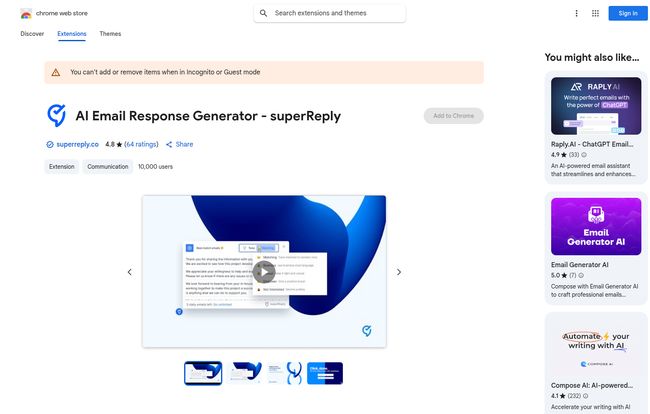
In a nutshell, superReply is a clever little Chrome extension that integrates directly into your Gmail or Outlook interface. It’s not a separate app you have to toggle to. It lives right there in your inbox. When you open an email, superReply reads it, understands the context and tone, and then suggests a few complete, ready-to-send replies.
The magic isn't just that it writes an email for you; it's that it tries to match the vibe of the conversation. If you get a super formal business inquiry, it generates a professional response. If it's a casual check-in from a colleague, the suggested replies are more laid-back. It's like having a tiny, hyper-efficient personal assistant who’s great at reading the room living inside your browser.
My First Impressions and Getting It Set Up
Installation was a breeze. If you’ve ever added an extension to Chrome, you know the drill. A couple of clicks on the Chrome Web Store, a quick permission grant, and boom—it's there. No complicated setup, no API keys to wrestle with, no headache. I appreciate that. I have zero patience for tools that require a 30-minute setup tutorial.
The first email I tried it on was a potential client asking about my SEO consulting packages. I clicked the little superReply icon, and within seconds, it offered three different drafts. One was a concise “Yes, I can help, let’s schedule a call.” Another was more detailed, referencing a specific point from their email. The third was a polite declination, just in case. It was… surprisingly good. It wasn't the generic, robotic text I’ve come to expect from first-gen AI. It felt human. Ish.
The Good Stuff That Made Me a Believer
After using it for a couple of weeks, a few things really stood out. First and foremost, the time savings are real. Replying to those routine, everyday emails—the “Thanks, got it,” “Let’s book that for Tuesday,” or “Can you send me the report?”—is now a one-click affair. That time adds up. It's like finding a twenty-dollar bill in an old coat pocket, every single day.
But the real hero feature for me is the tone-matching. I once got an email from a clearly frustrated client. superReply suggested responses that were empathetic and solution-oriented, which was exactly the right approach. It’s pretty adept at picking up on subtleties, which helps avoid those accidental email miscommunications that can spiral into bigger problems. It's not perfect, but it's a fantastic starting point that gets you 90% of the way there.
No Tool is Perfect: The Caveats
Alright, it’s not all sunshine and rainbows. There are a few things you should know before jumping in. For one, it’s a Chrome extension. If you’re a die-hard Safari or Firefox user, you're out of luck for now. This wasn't a problem for me, but it's a big deal for a lot of people.
The free plan is also quite… limited. You get three free AI-generated replies per day (so about 90 a month). This is great for a trial run, to see if you like the feel of it, but if you're dealing with any real email volume, you’ll hit that ceiling before your morning coffee is done. It’s more of a sampler than a truly functional free tier for a professional.
And finally, it's still AI. Sometimes it gets a little weird. I once had it suggest a reply that was way too enthusiastic for a simple confirmation email. You still need to give every response a quick once-over before hitting send. Don't just blindly trust the machine—use it as a co-pilot, not an autopilot.
Let's Talk Money: The superReply Pricing Plans
So, what does it cost to get this AI assistant working for you full-time? The pricing structure is pretty straightforward, which I appreciate. No confusing credit systems or convoluted tiers.
| Plan | Cost | What You Get |
|---|---|---|
| Free | $0 | Up to 3 email replies per day |
| Monthly | $24.99 / month | Unlimited emails, no commitment |
| Annual Plan | $10.70 / month (billed annually) | Unlimited emails, best value |
In my opinion, the free plan is a test drive. The monthly plan is great if you want to give it a serious, unlimited go for a month or two to quantify its impact. But if you decide this tool is for you, the annual plan is a no-brainer. The discount is massive, bringing the cost down to what you'd probably spend on a couple of fancy coffees a month. If it saves you even 3-4 hours of work a month, it's paid for itself several times over.
Who Should Use superReply? (And Who Can Probably Skip It)
This tool isn't for everyone. If you send five emails a week to your mom and your best friend, you can safely pass. But if your job involves a significant amount of email communication, you're the target audience.
I'm talking about:
- Sales Professionals & Entrepreneurs: Quickly responding to leads and inquiries is everything. Speed wins.
- Customer Support Agents: Answering the same questions over and over? This is your new best friend.
- Project Managers & Team Leads: Firing off quick confirmations, updates, and follow-ups without breaking your focus.
- Freelancers & Consultants: Juggling multiple clients means juggling multiple inboxes. This helps you stay on top of it all and maintain a professional image.
Basically, if you've ever looked at your inbox and let out a deep, soul-weary sigh, you should at least take the free plan for a spin.
Frequently Asked Questions about superReply
Is superReply safe to use with my email?
According to their privacy policy on the Chrome Web Store, the developer declares they don't sell your data or use it for purposes outside of the tool's core functionality. As with any extension, it's good to review the permissions, but their stated policy is reassuring.
Does it only work in English?
While the primary language is English, I've seen mentions of its ability to handle other languages. The AI models it's built on are often multilingual, but your mileage may vary depending on the language's complexity. Best to test it out.
Can I edit the responses before sending them?
Absolutely! And you should. The generated text appears right in your normal reply box, so you can tweak, add, or delete anything you want before you hit send. Think of it as a first draft, not a final command.
Will people know I'm using an AI to reply?
Honestly, probably not. Because it does a decent job with tone and you can edit it, the replies come across as pretty natural. They don't have that stiff, robotic quality that screams “WRITTEN BY A MACHINE.”
Is the Annual Plan really worth it?
If you're a heavy email user, I'd say yes. Calculate how much time you spend on email. If superReply can cut that time by even 20-30%, the annual cost becomes a rounding error compared to the value of the time you get back. Time is the one resource you cant make more of.
Final Thoughts: Is superReply Worth Your Time?
After a few weeks in the trenches with it, I've moved from skeptic to quiet fan. I haven't let it take over completely—my most important, nuanced emails still get the full, manual treatment. But for the 70% of my inbox that's just conversational back-and-forth, follow-ups, and confirmations? superReply is an incredible co-pilot.
It's not about being lazy. It’s about being strategic. It’s about automating the low-value tasks to free up mental energy for the high-value work that actually moves the needle. For me, that’s more time for deep SEO analysis, creative campaign strategy, and yes, even writing articles like this one. It's a small tool that delivers a big return: time. And I can't think of a better investment.


