
Categories: AI SVG Generator, AI Tools Directory, AI Youtube Thumbnail Generator
UltimateApp Review: An AI Toolkit or Just More Clutter?

Let's be real for a second. If you're a freelancer, a small business owner, or any kind of digital creator, your browser's bookmark bar is probably a war zone. I know mine is. I've got a link for an invoicing tool, another for a quick design fix, one for social media scheduling, a couple for AI writing assistants... it's a mess. Every month, I look at my credit card statement and see this trail of $5, $10, $15 subscriptions bleeding me dry. It's the cost of doing business, right?
Or is it?
I've been in the SEO and digital marketing world for long enough to become cynical about any new platform promising to be the 'one solution for everything'. It usually means it does ten things poorly instead of one thing well. So when I stumbled upon UltimateApp, which calls itself a 'Powerful Hub for AI & Business Tools', my skepticism-meter went up. But I decided to give it a fair shake. For science. And for my wallet.
First of all, What is UltimateApp Trying to Be?
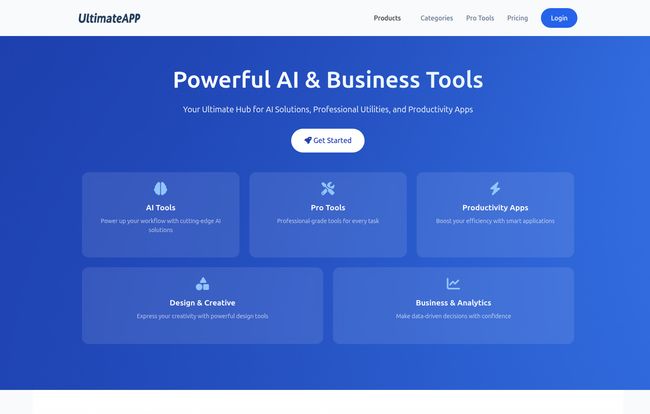
At its core, UltimateApp is an online platform that bundles a whole bunch of different tools under one roof. Think of it less like a specialized piece of software and more like a digital Swiss Army knife. One minute you're generating an invoice for a client, the next you're creating a book cover or using an AI to whip up a vector graphic.
It's designed to stop the tab-switching madness. Instead of logging into five different services, the idea is you just log into one. It’s a pretty compelling pitch, I have to admit.
My First Impressions of the Dashboard
So I signed up and landed on the main dashboard. It's clean. Almost... suspiciously clean. You know that feeling when you walk into a store and everything is so perfectly organized you're afraid to touch anything? It was a bit like that, but in a good way. The tools are laid out in a simple grid, with little icons and clear names: YouTube Thumbnail Generator, Invoice Generator, AI SVG Generator, Budget Planner.
Visit UltimateApp
One of the initial worries I had, which is listed as a potential con, is that the sheer number of tools could be overwhelming. And I can see that. It's a bit like being at a buffet—you want to try everything but you know you probably shouldn't. But the filtering system is decent. You can sort by categories like AI, Business, Design, etc. After about five minutes of clicking around, the feeling of being overwhelmed turned into a feeling of curiosity. What can this thing actually do?
A Quick Tour of the Toolbox
I decided to put a few of the tools to the test, focusing on the ones I'd typically use in my day-to-day grind.
For the Content Creators and Marketers
The YouTube Thumbnail Generator and Book Cover Generator immediately caught my eye. My own design skills are, uh, functional at best. I can make something that isn't an outright embarrassment, but it's not going to win any awards. The generators here are template-based and straightforward. You pick a layout, change the text, swap an image. It’s not going to replace a professional designer or a full-blown program like Photoshop, but for whipping up a decent-looking thumbnail in three minutes when you’re on a deadline? Absolutely. There's even a Meme Generator, which is probably more dangerous than useful in my hands.
For the Business Side of Things
This is where things get interesting for me. I hate invoicing. I hate chasing payments. The Invoice Generator is simple and does exactly what it says on the tin. You can create, manage, and track invoices without jumping over to another subscription service. Paired with the Budget Planner, it offers a neat little financial command center for a freelancer. Again, it’s not as complex as QuickBooks, but it’s not trying to be. It’s for the solopreneur who needs to get things done quickly and move on.
The AI Magic Wand
Okay, this is the fun stuff. The AI SVG Generator is pretty wild. You type in a text prompt like "a minimalist logo of a coffee cup with steam," and it spits out a scalable vector graphic. The results can be a bit of a mixed bag, as with most AI image tools, but the potential is huge for creating unique icons or design elements without any artistic skill. I also played with the AI Email Template Generator. It's surprisingly good for breaking writer's block when you need to send a professional-sounding outreach email or follow-up. It's a solid assistant.
The All-Important Question: The Price
So, what’s the catch? Usually, it's the price. I was bracing myself for some convoluted, multi-tiered pricing structure designed to confuse you into the most expensive plan. But it’s... refreshingly simple.
There are a bunch of tools available completely for free. They're marked with a little "Free" tag, and for many casual tasks, they're probably enough. But the real power, especially the AI tools and more advanced features, are in the Pro plan.
Is the Pro Plan Worth a Damn?
The pricing is where UltimateApp got a big nod of approval from me. It's very straightforward. You have two choices for the Pro plan, and they both give you access to everything.
| Plan | Price | Key Features |
|---|---|---|
| Monthly Plan | $9 / month | All Free, Pro, & AI Tools, Priority Support, Data Storage |
| Yearly Plan | $7.50 / month (billed as $90/year) | All Free, Pro, & AI Tools, Priority Support, Data Storage |
When you consider that a single, dedicated invoicing tool can cost $10-$20 a month, and a subscription to a good design platform can be another $15, this price is extremely competitive. For less than a tenner a month, you're consolidating a lot of those little expenses. That's a strong argument in its favor.
The Good, The Bad, and My Final Thoughts
I've always felt that the best tool is the one you actually use. After spending some time with UltimateApp, I can see myself genuinely using it. The convenience factor is massive. Having my invoicing, budget planning, and quick design tasks all in one place just simplifies my workflow. It declutters my brain as much as my bookmark bar.
The main sticking point for some might be the "jack of all trades, master of none" issue. If you are a professional graphic designer, the AI SVG generator is a novelty, not a replacement for Adobe Illustrator. If you're a CFO, the budget planner is a toy. But that's not who this is for.
This platform is built for the generalists. The freelancers, the content creators, the small business owners—the people who have to be their own designer, accountant, and marketer all at once. For us, a tool that is 80% as good as a specialized one but bundled with nine other equally useful tools for a fraction of the cost is a huge win.
So, is UltimateApp a revolutionary new force in the tech world? Probably not. But is it a genuinely useful, well-priced, and cleverly designed platform that could save you time, money, and a whole lot of headaches? In my experience, yes. It's earned a permanent spot in my own, now slightly cleaner, bookmark bar.
Frequently Asked Questions
- Is there a free trial for UltimateApp Pro?
- The platform doesn't advertise a formal 'free trial' for the Pro plan. However, there are numerous free tools available for you to use indefinitely. This gives you a great feel for the platform's interface and quality before you decide to upgrade for the Pro features.
- What kind of customer support can I expect?
- According to their pricing page, both the monthly and yearly Pro plans come with 24/7 priority support, which is a great feature at this price point.
- Can I switch between the monthly and yearly plans?
- Yes, the FAQ on their pricing page confirms that you can switch between plans. This offers flexibility if your business needs change or you want to take advantage of the yearly discount later on.
- What payment methods does UltimateApp accept?
- Their site indicates they accept major payment methods. Based on standard industry practice, this almost certainly includes major credit cards like Visa, Mastercard, and American Express.
- Are the AI tools difficult for a beginner to use?
- From my testing, no. The AI tools are built to be user-friendly. They operate on simple text prompts and clicks. If you can type a sentence and click a button, you can use these tools to generate designs and text, no advanced technical skill required.


